Page 1 of 2
Ausfall von HDMI und DP nach Nutzung eines HDMI Splitters
Posted: Sun Mar 02, 2025 10:55 am
by dijs69
Problem: Monitor erhält unter MX Linux kein Signal mehr über den Display Port oder den HDMI Port, d.h. weder Audio noch Video Signal. Das UEFI-BIOS Setup wird bei Nutzung von HDMI oder DP nicht angezeigt, d.h. bevor überhaupt ein Betriebssystem gebootet wurde. (Bei Anschluss des Monitors über den USB-C Port ist das anders.)
Auslöser: Verwendung einer neuen HDMI-Weiche (
https://www.ebay.de/itm/385590156154) mit Wiedergabeproblemen und (
https://www.ebay.de/itm/156368992833), anfangs ok, aber nach Umschalten schwarzer Bildschirm (no signal).
Systembeschreibung: Siehe Anlage. Der Rechner ist noch relativ neu und wurde als Dual-Boot System konfiguriert mit Windows 11 als alternatives OS.
Bisherige Analysen:
Eingrenzung des Fehlers durch Kombination verschiedener Hardware-Komponenten und Ausprobieren. Ergebnis: Monitor ist intakt. HDMI-Kabel und DP/HDMI-Kabel sind intakt. Audio/Video-Ausgabe möglich mit VGA-Kabel und USB-C/VGA-Adapter und Audio-Klinkenstecker.
Abgleich mit Situation unter Windows 11 (auf gleicher Hardware). Ergebnis: Video-Übertragung per HDMI funktioniert (!), aber kein Audio Signal via HDMI. Der Display Port liefert weder Video- noch Audio-Ausgaben.
Überprüfung der Konfiguration unter MX Linux. Siehe Anlage.
Recherche in Internet-Foren. Ergebnis: Unterschiedliche Fälle mit anderen Ursachen oder ungelöste ähnliche Fälle, z.B.
https://www.computerbase.de/forum/threa ... r.1884164/
https://unix.stackexchange.com/question ... ed-working
Re: Ausfall von HDMI und DP nach Nutzung eines HDMI Splitters
Posted: Sun Mar 02, 2025 11:10 am
by j2mcgreg
@dijs69
Bitte posten Sie Ihre vollständigen Quick System Info (QSI) und nicht die bearbeitete Version, die Sie angehängt haben. Forenregeln.
Re: Ausfall von HDMI und DP nach Nutzung eines HDMI Splitters
Posted: Sun Mar 02, 2025 11:12 am
by Eadwine Rose
In das Unterforum Sprache verschoben.
Die Forumssprache ist Englisch, bitte posten Sie auf Englisch im Forum, oder posten Sie in Ihrer Sprache in diesem Unterforum. Ich danke Ihnen.
Re: Ausfall von HDMI und DP nach Nutzung eines HDMI Splitters
Posted: Sun Mar 02, 2025 11:21 am
by dijs69
Code: Select all
System:
  Kernel: 6.12.16-1-liquorix-amd64 [6.12-21~mx23ahs] arch: x86_64 bits: 64 compiler: gcc v: 12.2.0 parameters: audit=0
    intel_pstate=disable amd_pstate=disable BOOT_IMAGE=/boot/vmlinuz-6.12.16-1-liquorix-amd64
    root=UUID=<filter> ro quiet splash resume=UUID=<filter> resume_offset=17946624
  Desktop: Xfce v: 4.20.0 tk: Gtk v: 3.24.38 info: xfce4-panel wm: xfwm v: 4.20.0 vt: 7
    dm: LightDM v: 1.32.0 Distro: MX-23.5_ahs_x64 Libretto September 15  2024 base: Debian GNU/Linux
    12 (bookworm)
Machine:
  Type: Mini-pc System: CSL GmbH product: Narrow Box Core i3 v: N/A serial: <superuser required>
  Mobo: CYX model: v1.0 serial: <superuser required> UEFI: American Megatrends LLC. v: 5.27
    date: 05/06/2024
Battery:
  Device-1: hidpp_battery_0 model: Logitech Wireless Keyboard K360 serial: <filter> charge: 100%
    (should be ignored) rechargeable: yes status: discharging
  Device-2: hidpp_battery_1 model: Logitech Wireless Mouse M325 serial: <filter>
    charge: 55% (should be ignored) rechargeable: yes status: discharging
CPU:
  Info: model: Intel Core i3-N305 bits: 64 type: MCP arch: Alder Lake gen: core 1 level: v3
    note: check built: 2021+ process: Intel 7 (10nm ESF) family: 6 model-id: 0xBE (190) stepping: 0
    microcode: 0x1A
  Topology: cpus: 1x cores: 8 smt: <unsupported> cache: L1: 768 KiB desc: d-8x32 KiB; i-8x64 KiB
    L2: 4 MiB desc: 2x2 MiB L3: 6 MiB desc: 1x6 MiB
  Speed (MHz): avg: 837 high: 1000 min/max: 800/1801 boost: enabled scaling: driver: acpi-cpufreq
    governor: ondemand cores: 1: 1000 2: 800 3: 800 4: 800 5: 813 6: 887 7: 800 8: 800
    bogomips: 28876
  Flags: avx avx2 ht lm nx pae sse sse2 sse3 sse4_1 sse4_2 ssse3 vmx
  Vulnerabilities:
  Type: gather_data_sampling status: Not affected
  Type: itlb_multihit status: Not affected
  Type: l1tf status: Not affected
  Type: mds status: Not affected
  Type: meltdown status: Not affected
  Type: mmio_stale_data status: Not affected
  Type: reg_file_data_sampling mitigation: Clear Register File
  Type: retbleed status: Not affected
  Type: spec_rstack_overflow status: Not affected
  Type: spec_store_bypass mitigation: Speculative Store Bypass disabled via prctl
  Type: spectre_v1 mitigation: usercopy/swapgs barriers and __user pointer sanitization
  Type: spectre_v2 mitigation: Enhanced / Automatic IBRS; IBPB: conditional; RSB filling;
    PBRSB-eIBRS: Not affected; BHI: BHI_DIS_S
  Type: srbds status: Not affected
  Type: tsx_async_abort status: Not affected
Graphics:
  Device-1: Intel Alder Lake-N [UHD Graphics] driver: i915 v: kernel alternate: xe arch: Gen-12.2
    process: Intel 10nm built: 2021-22+ ports: active: DP-1 empty: DP-2,HDMI-A-1,HDMI-A-2
    bus-ID: 00:02.0 chip-ID: 8086:46d0 class-ID: 0300
  Display: x11 server: X.Org v: 1.21.1.7 compositor: xfwm v: 4.20.0 driver: X:
    loaded: modesetting unloaded: fbdev,vesa dri: iris gpu: i915 display-ID: :0.0 screens: 1
  Screen-1: 0 s-res: 1920x1080 s-dpi: 96 s-size: 509x286mm (20.04x11.26") s-diag: 584mm (22.99")
  Monitor-1: DP-1 model: Philips 273PLPH serial: <filter> built: 2013 res: 1920x1080 hz: 60
    dpi: 82 gamma: 1.2 size: 598x336mm (23.54x13.23") diag: 686mm (27") ratio: 16:9 modes:
    max: 1920x1080 min: 720x400
  API: OpenGL v: 4.6 Mesa 24.2.2-1~mx23ahs renderer: Mesa Intel Graphics (ADL-N)
    direct-render: Yes
Audio:
  Device-1: Intel driver: snd_hda_intel v: kernel alternate: snd_soc_avs,snd_sof_pci_intel_tgl
    bus-ID: 1-6:6 bus-ID: 00:1f.3 chip-ID: 0573:1573 class-ID: 0300 chip-ID: 8086:54c8
    serial: <filter> class-ID: 0403
  Device-2: Zoran Personal Media Division (Nogatech) USB Audio and HID type: USB
    driver: snd-usb-audio
  API: ALSA v: k6.12.16-1-liquorix-amd64 status: kernel-api tools: alsamixer,amixer
  Server-1: PipeWire v: 1.0.0 status: active with: 1: pipewire-pulse status: active
    2: wireplumber status: active 3: pipewire-alsa type: plugin 4: pw-jack type: plugin
    tools: pactl,pw-cat,pw-cli,wpctl
Network:
  Device-1: Realtek driver: rtw89_8852be v: kernel modules: wl pcie: gen: 1 speed: 2.5 GT/s
    lanes: 1 port: 4000 bus-ID: 01:00.0 chip-ID: 10ec:b852 class-ID: 0280
  IF: wlan0 state: up mac: <filter>
  Device-2: Realtek RTL8111/8168/8411 PCI Express Gigabit Ethernet driver: r8169 v: kernel pcie:
    gen: 1 speed: 2.5 GT/s lanes: 1 port: 3000 bus-ID: 02:00.0 chip-ID: 10ec:8168 class-ID: 0200
  IF: eth0 state: up speed: 1000 Mbps duplex: full mac: <filter>
  Device-3: Realtek RTL8153 Gigabit Ethernet Adapter type: USB driver: r8152 bus-ID: 2-2.1:4
    chip-ID: 0bda:8153 class-ID: 0000 serial: <filter>
  IF: eth1 state: down mac: <filter>
Bluetooth:
  Device-1: Realtek Bluetooth Radio type: USB driver: btusb v: 0.8 bus-ID: 1-1:2 chip-ID: 0bda:b85b
    class-ID: e001 serial: <filter>
  Report: hciconfig ID: hci0 rfk-id: 1 state: up address: <filter> bt-v: 3.0 lmp-v: 5.2
    sub-v: 9301 hci-v: 5.2 rev: 447
  Info: acl-mtu: 1021:6 sco-mtu: 255:12 link-policy: rswitch hold sniff park
    link-mode: peripheral accept service-classes: rendering, capturing, object transfer, audio,
    telephony
Drives:
  Local Storage: total: 931.51 GiB used: 70.17 GiB (7.5%)
  SMART Message: Unable to run smartctl. Root privileges required.
  ID-1: /dev/nvme0n1 maj-min: 259:0 vendor: Kingston model: SNV2S1000G size: 931.51 GiB
    block-size: physical: 512 B logical: 512 B speed: 63.2 Gb/s lanes: 4 type: SSD serial: <filter>
    rev: CBG04418 temp: 39.9 C scheme: GPT
Partition:
  ID-1: / raw-size: 125.28 GiB size: 122.76 GiB (97.98%) used: 36.81 GiB (30.0%) fs: ext4
    dev: /dev/nvme0n1p5 maj-min: 259:5
  ID-2: /boot/efi raw-size: 260 MiB size: 259.5 MiB (99.80%) used: 50.6 MiB (19.5%) fs: vfat
    dev: /dev/nvme0n1p2 maj-min: 259:2
Swap:
  Kernel: swappiness: 15 (default 60) cache-pressure: 100 (default)
  ID-1: swap-1 type: partition size: 15.62 GiB used: 0 KiB (0.0%) priority: -2
    dev: /dev/nvme0n1p7 maj-min: 259:7
  ID-2: swap-2 type: file size: 19.4 GiB used: 0 KiB (0.0%) priority: -3 file: /swap/swap
Sensors:
  System Temperatures: cpu: 48.0 C mobo: N/A
  Fan Speeds (RPM): N/A
Repos:
  Packages: pm: dpkg pkgs: 2316 libs: 1182 tools: apt,apt-get,aptitude,nala,synaptic pm: rpm
    pkgs: 0 pm: flatpak pkgs: 0
  No active apt repos in: /etc/apt/sources.list
  Active apt repos in: /etc/apt/sources.list.d/debian-stable-updates.list
    1: deb http://deb.debian.org/debian bookworm-updates main contrib non-free non-free-firmware
  Active apt repos in: /etc/apt/sources.list.d/debian.list
    1: deb http://deb.debian.org/debian bookworm main contrib non-free non-free-firmware
    2: deb http://security.debian.org/debian-security bookworm-security main contrib non-free non-free-firmware
  Active apt repos in: /etc/apt/sources.list.d/freedownloadmanager.list
    1: deb [arch=amd64 signed-by=/usr/share/keyrings/freedownloadmanager.gpg] https://debrepo.freedownloadmanager.org/ jammy main
  Active apt repos in: /etc/apt/sources.list.d/mx.list
    1: deb http://ftp.halifax.rwth-aachen.de/mxlinux/packages/mx/repo/ bookworm main non-free
    2: deb http://ftp.halifax.rwth-aachen.de/mxlinux/packages/mx/repo/ bookworm ahs
  Active apt repos in: /etc/apt/sources.list.d/teamviewer.list
    1: deb [signed-by=/usr/share/keyrings/teamviewer-keyring.gpg] https://linux.teamviewer.com/deb stable main
Info:
  Processes: 288 Uptime: 4h 57m wakeups: 39 Memory: 15.41 GiB used: 3.83 GiB (24.9%) Init: SysVinit
  v: 3.06 runlevel: 5 default: graphical tool: systemctl Compilers: gcc: 12.2.0 alt: 12
  Client: shell wrapper v: 5.2.15-release inxi: 3.3.26
Boot Mode: UEFI
Re: Ausfall von HDMI und DP nach Nutzung eines HDMI Splitters
Posted: Sun Mar 02, 2025 11:27 am
by schwarzheit
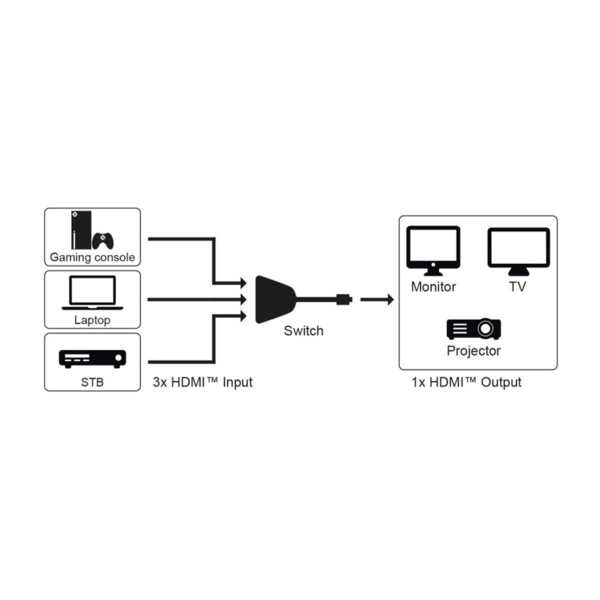
Ich tippe mal auf Verwendung falsch herum. Also Eingänge mit Ausgang verwechselt.
Re: Failure of HDMI and DP after using an HDMI splitter
Posted: Sun Mar 02, 2025 11:31 am
by dijs69
I'm sorry for any confusion concerning language; german or english is both fine for me. I just noticed a Google assistant at the top of the page, which unwantedly performs a translation and which leaves me confused myself. I believe the request should be left in the english forum.
Re: Ausfall von HDMI und DP nach Nutzung eines HDMI Splitters
Posted: Sun Mar 02, 2025 11:47 am
by dijs69
Leider nein. Ich habe den Switch so verwendet wie oben dargestellt. Der Anwendungsfall ist: Ein Monitor für zwei PCs.
Re: Ausfall von HDMI und DP nach Nutzung eines HDMI Splitters
Posted: Mon Mar 03, 2025 5:10 pm
by vel178
Monitor-1: DP-1 model: Philips 273PLPH serial: <filter> built: 2013 res: 1920x1080 hz: 60
dpi: 82 gamma: 1.2 size: 598x336mm (23.54x13.23") diag: 686mm (27") ratio: 16:9 modes:
max: 1920x1080 min: 720x400
Mx findet schon mal den Monitor, gut. Könnte sein das wegen dem Adapter die EDID Info vom Monitor nicht an xrandr weitergegeben wird. Hätte jetzt mal versucht die Auflösung für den Ausgang manuell zu senden mit
Code: Select all
xrandr --addmode DP1 1920x1080_60.00
xrandr --output DP1 --auto
Re: Ausfall von HDMI und DP nach Nutzung eines HDMI Splitters
Posted: Wed Mar 05, 2025 2:45 am
by dijs69
DP1 wäre dann ein neuer Mode (der nicht gefunden wird)? Ich habe es auch mit DP-1 versucht und erhalte folgende Ausgabe:
$ xrandr --addmode DP-1 1920x1080_60.00
xrandr: cannot find mode "1920x1080_60.00"
Was mich eher stutzig macht, ist die Info "HDMI-1 disconnected" und "DP-1 connected":
$ xrandr
Screen 0: minimum 320 x 200, current 1920 x 1080, maximum 16384 x 16384
HDMI-1 disconnected (normal left inverted right x axis y axis)
DP-1 connected 1920x1080+0+0 (normal left inverted right x axis y axis) 598mm x 336mm
1920x1080 60.00*+ 59.94
Auch der Display Port (mutmaßlich DP-1) funktioniert nicht.
Re: Ausfall von HDMI und DP nach Nutzung eines HDMI Splitters
Posted: Fri Mar 14, 2025 3:48 am
by dijs69
Die Symptome verleiten mich zu der Annahme, dass die Hardware schadhaft ist, so dass ich mich zu einer Reklamation des PCs entschlossen habe.